The A2UI Catalog Now Renders Inside Claude.ai
You can now connect a2uicatalog.ai to Claude and get real rendered UI back in the conversation — charts, gauges, steppers, decision trees, dashboards — without the model writing a single line of HTML. It names an atom from a fixed vocabulary of 474, and a renderer that already knows how to draw each one does the rest.
Here's how
No signup, no API key, nothing to install.
Claude Desktop — Settings → Connectors → Add custom connector:
Name: A2UI Catalog
URL:  https://a2uicatalog.ai/mcp
claude.ai (web) — Settings → Connectors → Add connector, same URL.
Then ask for something real:
Using the A2UI catalog, render a
stat_cardwith value "1,234", label "Daily users", delta "+12%".
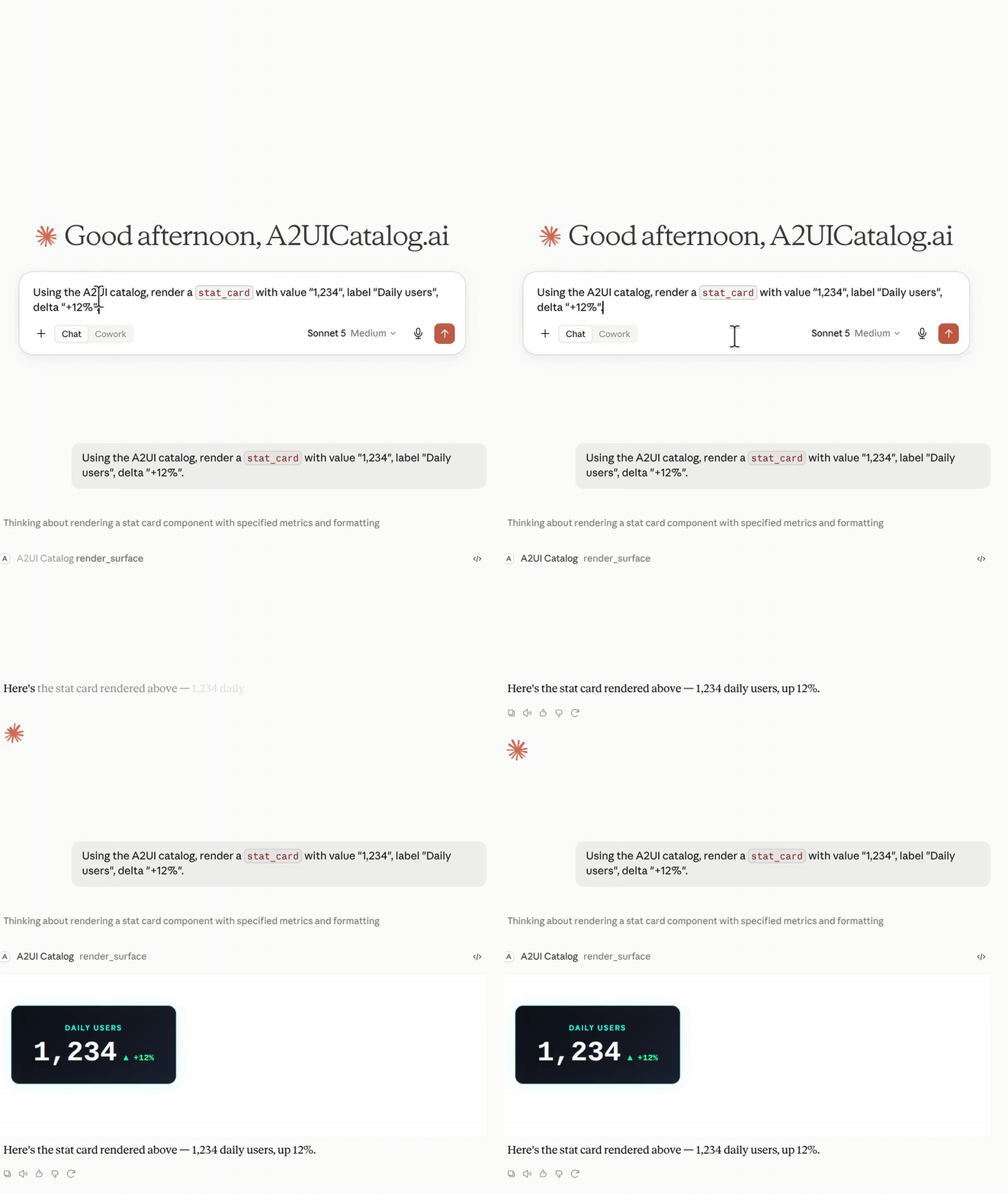
What you can ask for
Anything in the catalog, by name or by description. A few that work well:
Build me a small dashboard: a
stat_card, aprogress_barand achartjs_bar— pick reasonable data.Render a
sankey_flowshowing traffic from three sources into two destinations, dark theme.Show me the atoms available for a status page, then render one.
470 of the 474 atoms render on this surface. Claude picks from the real field contracts rather than guessing — if something looks wrong, ask it to check the catalog again.
The same payload also renders on Apps Script, Google Meet, Google Chat and Teams. That's the point of a typed vocabulary over generated markup: the model only has to pick the right name, and the renderer is already correct on every surface.
The model doesn't write the UI. It names a component from a typed vocabulary, and a renderer that already knows that component draws it.
Thanks to the repo that unblocked this
Getting this working was harder than it should have been. A spec-conformant MCP Apps server can negotiate the capability, serve the resource, and still never render — the iframe simply doesn't mount, with no error anywhere. There's an open upstream issue describing exactly that.
What unblocked me was primevalsoup/mcp-apps-claude-demo — a tiny, dependency-free, MIT-licensed MCP server that renders correctly in Claude, built specifically to document the requirements. Its central point: several implementation details are mandatory for claude.ai even though the specification marks them optional. Reading that working implementation beat re-reading the spec. If you're staring at the same silent non-mount, start there.
Try it: a2uicatalog.ai/surfaces/mcp-apps has the playground and the full atom list, or just add the connector above and ask Claude for a dashboard.