A2UI on Google Slides: build a deck from an agent's payload
Google Slides is a trademark of Google LLC. This is an independent open source project. It is not affiliated with, endorsed by or sponsored by Google.
This is the week Claude adds an integration with Google Workspace add-ons, so I thought I'd spend a bit more time on the surface I have a soft spot for. This time it's Google Slides.
An agent now sends the catalog a payload, the same JSON it would send for a web page or an email, and gets back a PowerPoint file that opens in Google Slides. The quote, the stats row, the table and the call to action all become real slide shapes, so you can edit them.
Why the route goes through PowerPoint
My biggest discovery recently was how good Gemini is at XML, and at getting from XML to other formats. It got me wondering whether that could be a route to Google Slides.
It is, and the route goes through Microsoft's PPTX. Google Slides opens a .pptx file and converts it, and the format underneath is a zip of XML parts. So one converter gets you PowerPoint and Google Slides together. I wrote the converter once, and the PowerPoint surface came with it. I've written about that side in a separate piece.
Gemini also did a fair amount of the typing. It drafted most of the 79 atom recipes from each atom's field description, and I reviewed and tested every one.
How to create Google Slides from an AI agent
Three MCP tools do the work, all on a2uicatalog.ai/mcp:
deck_schemalists the layouts, their limits and the atoms that have a slide recipe.deck_validatechecks a payload and returns every problem with its slide, field and limit. It isn't counted against the demo limit.deck_buildbuilds the .pptx and gives you a download link (kept for one hour), plus a report. The demo allows 10 builds a day per connection.
Tell it the target is google-slides and the text is fitted a little tighter, because Roboto is available there. I asked for "ITIL 5 at a glance" as a test. From request to a deck checked in Google Slides took about 90 seconds, and most of that was me reading sources.
How the pipe works
This is the whole path, drawn by the catalog's sequence_diagram atom from a handful of fields. It's the same atom that draws the diagram in my durable state article.
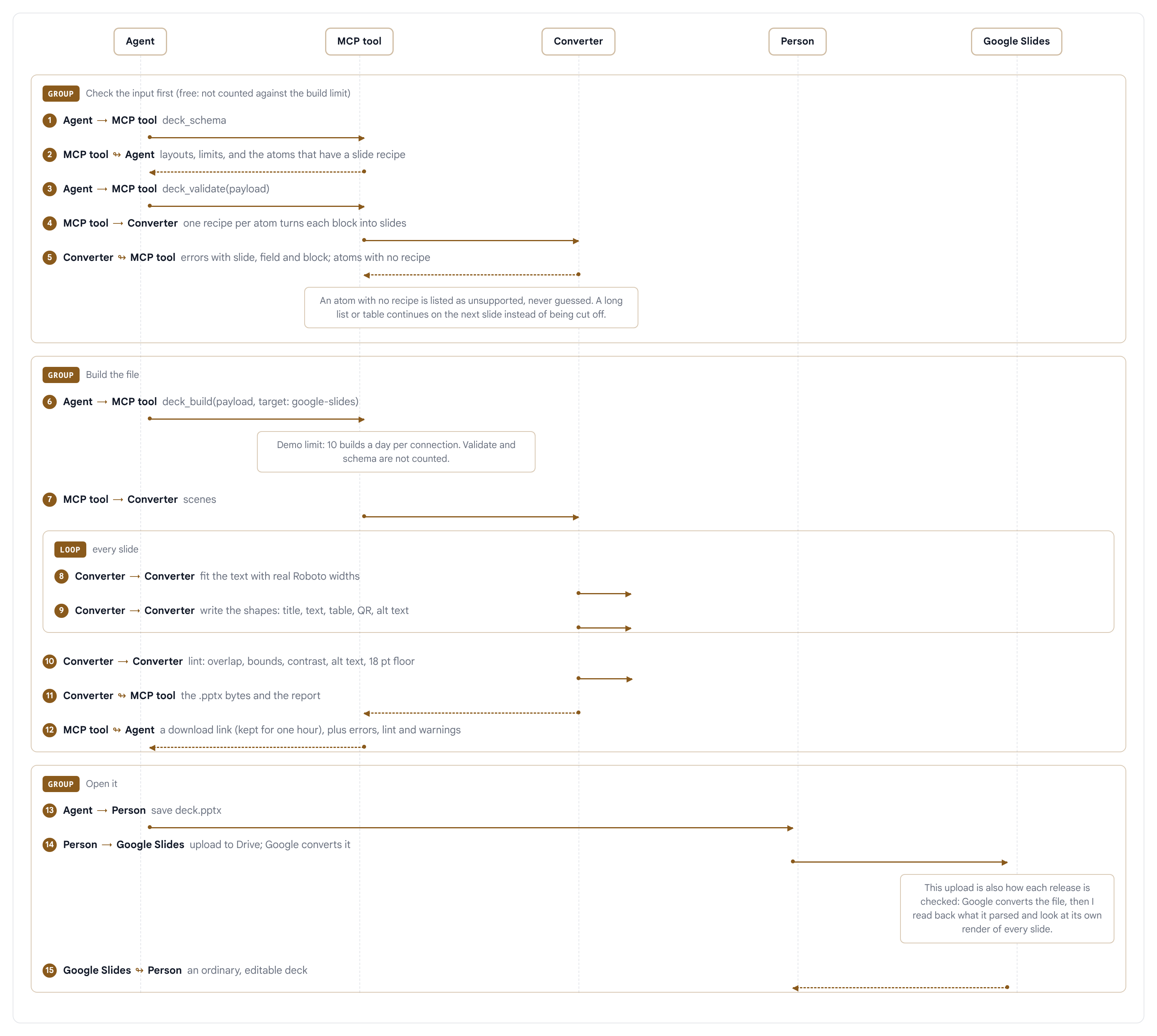
The first group is the checking. An atom with no recipe is listed as unsupported on the MCP tools and never guessed at (the Python converter can draw it as a picture, which the tools can't). A long list or table continues on the next slide, because I'd rather have two slides than cut something off.
The second group is the build. For every slide the converter measures the text with real Roboto widths and picks the largest size that wraps the same way even if the font gets swapped. It writes the shapes in reading order, with a real title on every slide, alt text on pictures and speaker notes where you give them. It then reads the file back and lints it for overlaps, bounds, contrast and the 18 pt floor. The same input gives the same bytes.
The third group is you opening the file. I check each release the same way: upload it, let Google convert it, read back what it parsed and look at Google's own render of every slide.
What's under the hood
Almost all of it is open source software I didn't write:
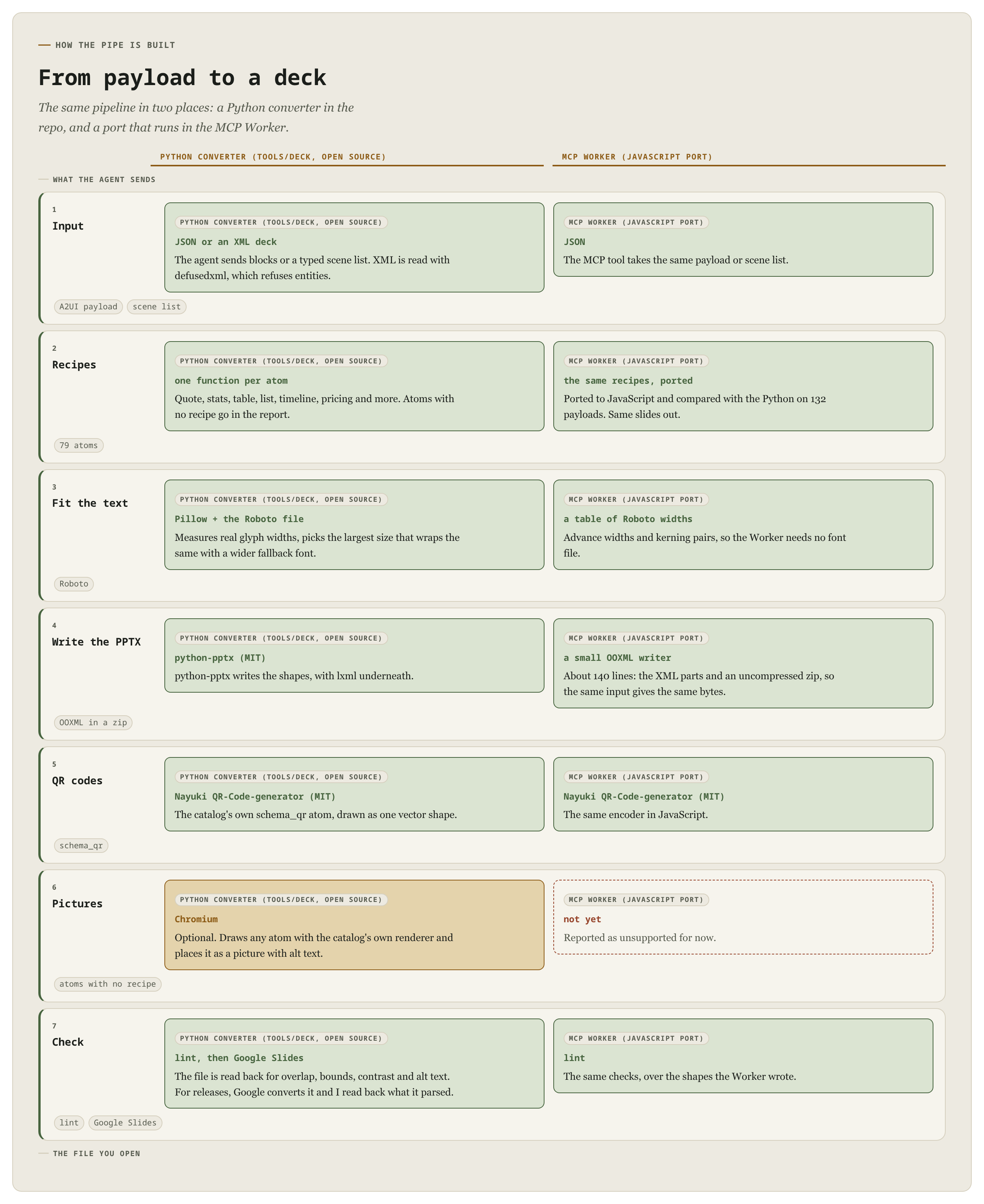
- python-pptx (MIT) writes the PPTX in the Python converter, with lxml underneath.
- Pillow and the Roboto font measure the text.
- defusedxml reads the XML deck language and refuses entities.
- Nayuki's QR-Code-generator (MIT) draws the QR code on the call to action slide, as one vector shape.
The converter itself is in the a2ui repo under tools/deck. The MCP tools run a JavaScript port of it on a Cloudflare Worker, with a small hand-written PPTX writer in place of python-pptx. I compared the two on more than 130 payloads and the slides they produce match shape for shape.
What it doesn't do yet
- Google Slides is the target I check every release. Four sample decks have also opened in desktop PowerPoint without problems, but that's one person on one machine, so I say "checked in Google Slides" and nothing stronger.
- 79 atoms have slide recipes. The rest of the catalog is interactive, so there's nothing for a slide to show.
- In the Python converter, an atom with no recipe can be drawn as a picture. That isn't editable, and the Worker doesn't do it yet.
- An animated GIF survives the trip into Google Slides, but it only plays in slideshow mode.
Try it
The Google Slides surface page lists the 79 atoms with a live preview of each. Add the MCP connector to Claude, ChatGPT or any MCP client and ask for a deck, or run the converter yourself from the repo. If a deck comes out wrong, I'd like to see the payload.
Google Slides and Google Workspace are trademarks of Google LLC. Microsoft PowerPoint is a trademark of the Microsoft group of companies. A2UI Catalog is an independent project and is not affiliated with, endorsed by or sponsored by either company.