A2UI to PowerPoint: build a .pptx from an agent's payload
Microsoft and PowerPoint are trademarks of the Microsoft group of companies. This is an independent open source project. It is not affiliated with, endorsed by or sponsored by Microsoft.
The same week I added Google Slides as a surface, PowerPoint came with it. That wasn't planned. Google Slides opens a .pptx file, so the converter that gets an A2UI payload into Slides is, underneath, a PowerPoint file builder. I'd rather say that plainly than pretend I built two things.
Why I went through XML
My biggest discovery recently was how good Gemini is at XML, and at turning XML into other formats. A .pptx file is exactly that: a zip of XML parts. Once I looked at it that way, the job was less about slides and more about writing the right XML, in the right order, with the right text sizes. That's the kind of thing a deterministic converter does well, and it's why the same input gives the same file every time.
What is inside a .pptx file
Rename a .pptx to .zip and open it. You'll find something like this:
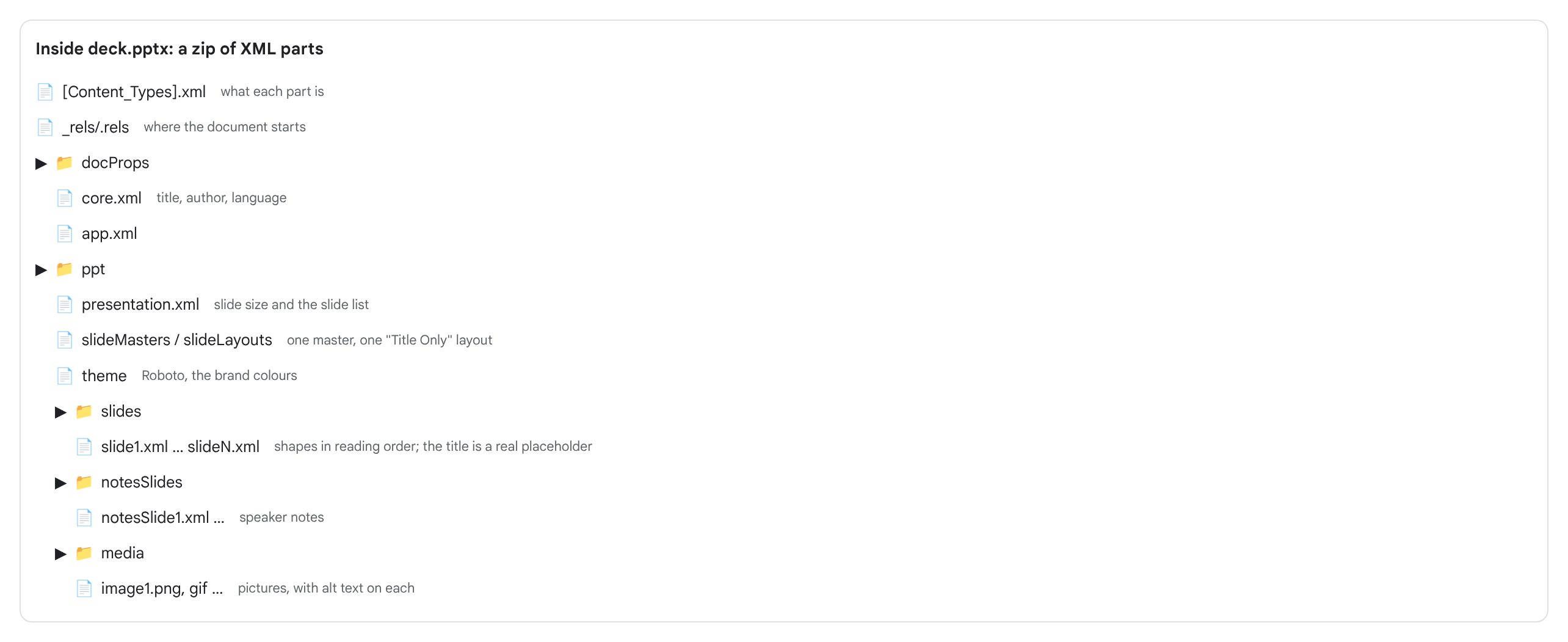
Each slide is one XML file. The shapes sit in reading order, which is what a screen reader follows, and the title is a real title placeholder rather than a big text box. Pictures carry alt text, and speaker notes are their own part. If any of that is missing, the file still opens, but it's harder to use. So the converter writes all of it, and a lint step reads the file back to check.
In the Python converter, python-pptx writes these parts. The MCP tools run on a Cloudflare Worker, which has no python-pptx, so I wrote a small PPTX writer in JavaScript, about 140 lines, that produces the XML parts and an uncompressed zip. I compared the two on more than 130 payloads, and the slides match shape for shape.
How to create a PowerPoint from an AI agent
Three MCP tools on a2uicatalog.ai/mcp:
deck_schemalists the layouts, their limits and the 79 atoms that have a slide recipe.deck_validatechecks a payload and says exactly which slide and field is wrong. It isn't counted against the demo limit.deck_buildbuilds the .pptx and gives you a download link (kept for one hour), plus a report. The demo allows 10 builds a day per connection.
Here is the whole path:
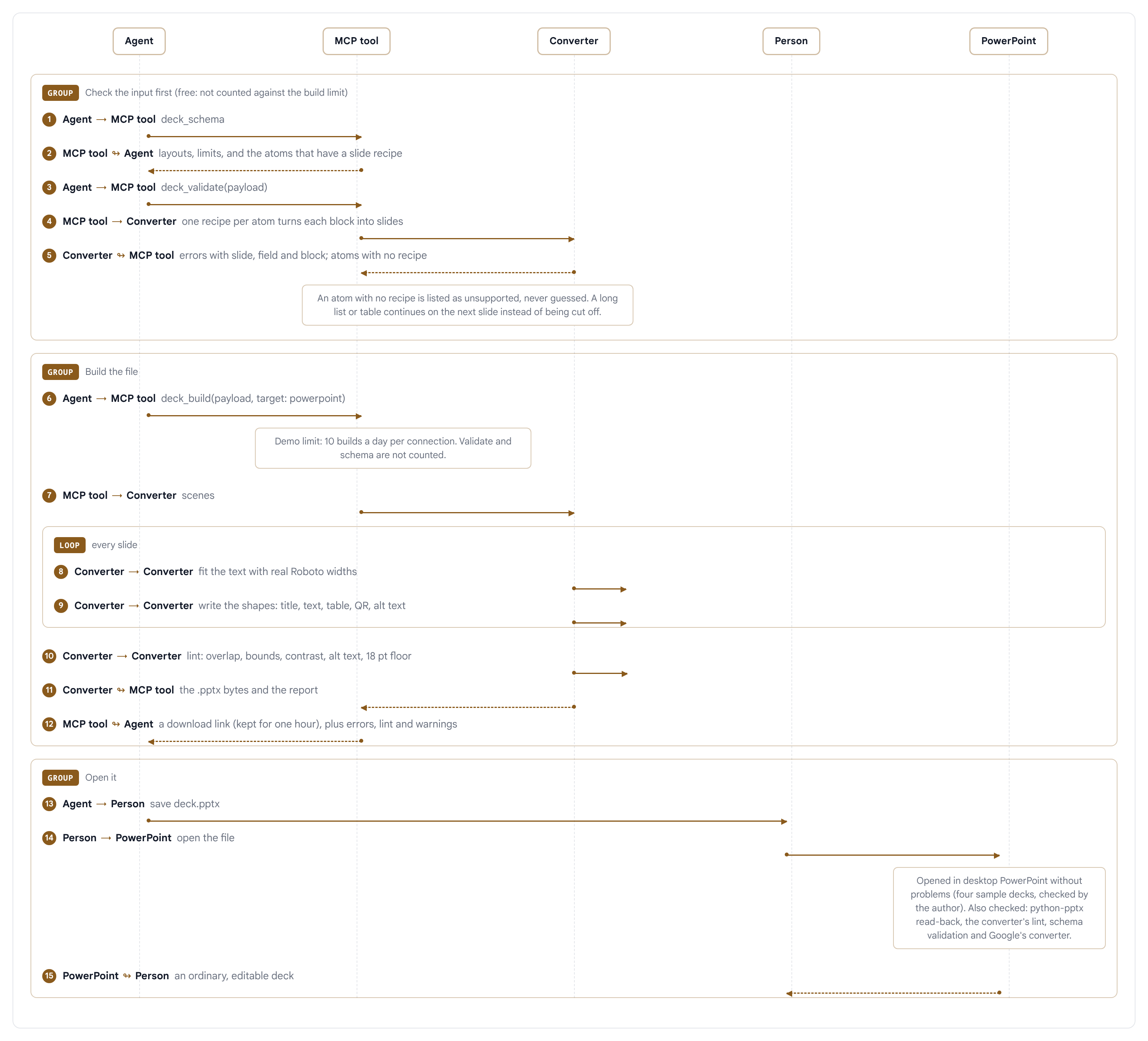
The agent asks for the schema, validates its payload, then builds. The converter turns each atom into slides with one recipe per atom, fits the text, writes the file and lints it. An atom with no recipe is reported as unsupported on the MCP tools and never guessed at (the Python converter can draw it as a picture, which the tools can't). The agent hands you the file.
Why the PowerPoint target keeps a margin for fonts
The decks use Roboto, and a deck doesn't embed fonts. If the machine that opens your file doesn't have Roboto, PowerPoint swaps in another font, and some fallbacks are wider. Text that fitted on one line can then wrap onto two and run out of its box.
So the powerpoint target uses a 12% margin. For every text box, the converter picks a size where the wrap has the same number of lines in Roboto and in a font about 12% wider. The google-slides target uses 3%, because Roboto is there. It's a cost: PowerPoint decks have slightly smaller text and slightly narrower boxes. I prefer that to a slide that breaks on someone else's laptop.
What I've checked, and what I haven't
Four sample decks (stat cards, idea cards, the QR call to action and a 26-slide text-heavy one) opened in desktop PowerPoint without any problems. That's one person on one machine, so it's evidence and not a guarantee. Behind that: python-pptx reads the files back, the converter's own lint is clean, a schema check against the ECMA-376 transitional schemas passed on 31 decks, LibreOffice rendered a sample of them with the layouts intact, and Google's converter opens them and draws every slide correctly.
What I haven't done is test other PowerPoint versions or platforms, or a machine without Roboto, which is what the 12% margin is for. If you open one and something is off, tell me what you see.
What's under the hood
- python-pptx (MIT) and lxml write the file in the Python converter.
- Pillow and Roboto measure the text.
- Nayuki's QR-Code-generator draws the QR code on the call to action slide, as one vector shape.
- defusedxml reads the XML deck language and refuses entities.
The converter is in the a2ui repo under tools/deck. The Google Slides article has the full architecture diagram.
Try it
The PowerPoint surface page lists every atom with a slide recipe. Add the MCP connector to your agent and ask it for a deck, or run the converter from the repo.
Microsoft and PowerPoint are trademarks of the Microsoft group of companies. Google Slides and Google Workspace are trademarks of Google LLC. A2UI Catalog is an independent project and is not affiliated with, endorsed by or sponsored by either company.