Explain Me Anything
Ask for any process. Watch it drawn.
A model writes a few lines, our code draws them. Try your own question.
Opens a full-screen panel. You bring your own API key and it stays in your browser.
How it works
- You ask for any process.How does logging in with an identity provider work?
- A model writes a few lines.
flowchart LR
  U([The user]):::user -->|opens app| App[Web app]:::app
  App -->|redirect| IdP[Identity provider]:::server
  IdP -->|login form| U
  U -->|credentials| IdP
and 4 more linesThis one is saved, no model ran. - Our macro pack lays them out and draws the picture.5 boxes, 8 arrows.
- You see it, with the steps as text.8 steps. First: The user connects to Web app for opens app.
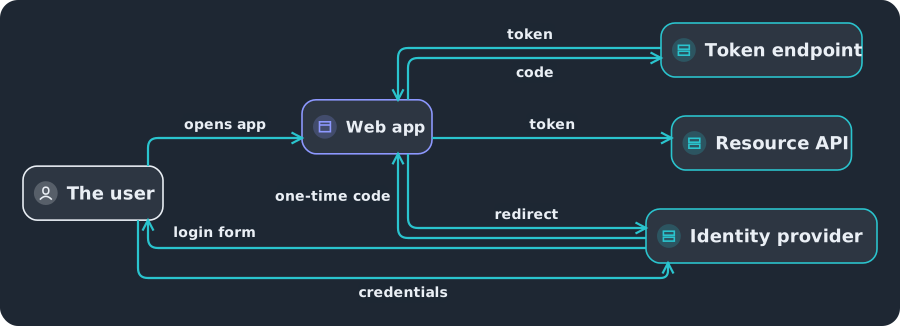
Drawn by one of our macro packs, not by a model.
Show the steps
- The user connects to Web app for opens app.
- Web app connects to Identity provider for redirect.
- Identity provider connects to The user for login form.
- The user connects to Identity provider for credentials.
- Identity provider connects to Web app for one-time code.
- Web app connects to Token endpoint for code.
- Token endpoint connects to Web app for token.
- Web app connects to Resource API for token.

Good to know
Limits
Drawings have at most 12 boxes, 16 arrows and 4 groups. Our code checks each drawing against these limits before it shows it.
Where the saved examples come from
Saved examples. The diagram text and the drawing were made by our own private tools, which are not published. The panel behind the Try it button shows a model's own reply instead.
The drawing is done by one of our macro packs: ordinary code, not a model. The same text always gives the same picture.
- Run it on your host
- Get the code: not published yet
- Results by renderer
- Live showcase
For developers: both catalog routes and details
A macro pack, in our catalogue, is a bundle of small pieces of code that turn a few lines of text into finished pictures. This one turns Mermaid into an animated SVG. "Macro pack" is our term; A2UI itself calls the building blocks components.
The demo with both catalog routes
The demo
Two routes, one page. Choose how to see it below, or open this page with the custom catalog route already chosen.
- Basic catalog
- Custom catalog (proposed)
- Route: stock Image
- Route: motion_arch atom
- You ask for a process
- A model writes a few lines of Mermaid
- Our code lays it out and draws it
- The host shows it
STORED, scripted example, no model ran
The same diagram as text
- The user connects to Web app for opens app.
- Web app connects to Identity provider for redirect.
- Identity provider connects to The user for login form.
- The user connects to Identity provider for credentials.
- Identity provider connects to Web app for one-time code.
- Web app connects to Token endpoint for code.
- Token endpoint connects to Web app for token.
- Web app connects to Resource API for token.
What the model wrote
flowchart LR
  U([The user]):::user -->|opens app| App[Web app]:::app
  App -->|redirect| IdP[Identity provider]:::server
  IdP -->|login form| U
  U -->|credentials| IdP
  IdP -->|one-time code| App
  App -->|code| Tok[Token endpoint]:::server
  Tok -->|token| App
  App -->|token| API[Resource API]:::server
Saved examples. The diagram text and the drawing were made by our own private tools, which are not published. The panel behind the Try it button shows a model's own reply instead.
How the live demo works and where your data goes
Try it yourself
Type a question. Your own Gemini key asks the model from this tab, the model writes a short diagram as text, our drawing service draws it, and you get the picture and the steps.
- Your question
- Your key calls the model
- Our Worker draws
- Picture and steps
Where your data goes
- Your question goes to Google (the Gemini API), under Google's terms, using your key. We never receive it.
- Free-tier prompts may be read by Google's reviewers. As of 16 November 2026, Google's Gemini API terms say that on the free tier "human reviewers may read, annotate, and process your API input and output", and that Google uses the content to improve its products. Paid use is treated differently. Check Google's current terms before you rely on any of this.
- The diagram text the model writes (not your key, not your question) goes to our drawing service. It draws the picture and keeps no copy. It writes one log line per request with the route, the result code, the size of the request and whether it was refused, and it keeps a count of drawings per day. It does not log the text, any key or the check token, and our code does not log your address. To limit abuse it counts requests under a one-way hash of your address and the date.
- Your key stays in this tab. It is held in memory, sent only to Google, never put in the address and never sent to us. A browser extension or a script on this page could read it, so use a throwaway key and delete it afterwards.
Explain Me Anything
LIVE gemini-3.5-flash-lite
Ask for a process. A model writes a few lines, code draws it.
What process should I explain?
Type something that happens in steps, and watch it drawn as a diagram.
Problem:
What the model wrote (first 600 characters, shown as plain text):
Your diagram
LIVE
Show the steps
The same diagram as text
Show the model's text
The diagram text the model wrote, as plain text:
This diagram is large. Scroll it, or press Fit to see it all at once.